
Create a professional email signature. Free.

Ready in seconds. Try Now!

Look professional in every email without designing, coding, or dealing with complicated setup. Add your details, choose a style, and copy it straight into Gmail, Outlook, or Apple Mail.

  • No credit card
  • No watermark
  • No design or coding required

Make your first one

Free · Minimal
Color · Indigo
Add logo, links & more

Type your name to start. Nothing you type leaves your browser.

How it works

Create your signature in 3 simple steps.

  1. Step 1

    Add your details

    Enter your name, title, company, contact info, and social links.

  2. Step 2

    Choose a layout and colors

    Pick a template, upload your logo or photo, and match your brand.

  3. Step 3

    Copy it into your email

    Copy your signature and paste it into Gmail, Outlook, or Apple Mail.

Your brand in every email

Make every email you send look on-brand.

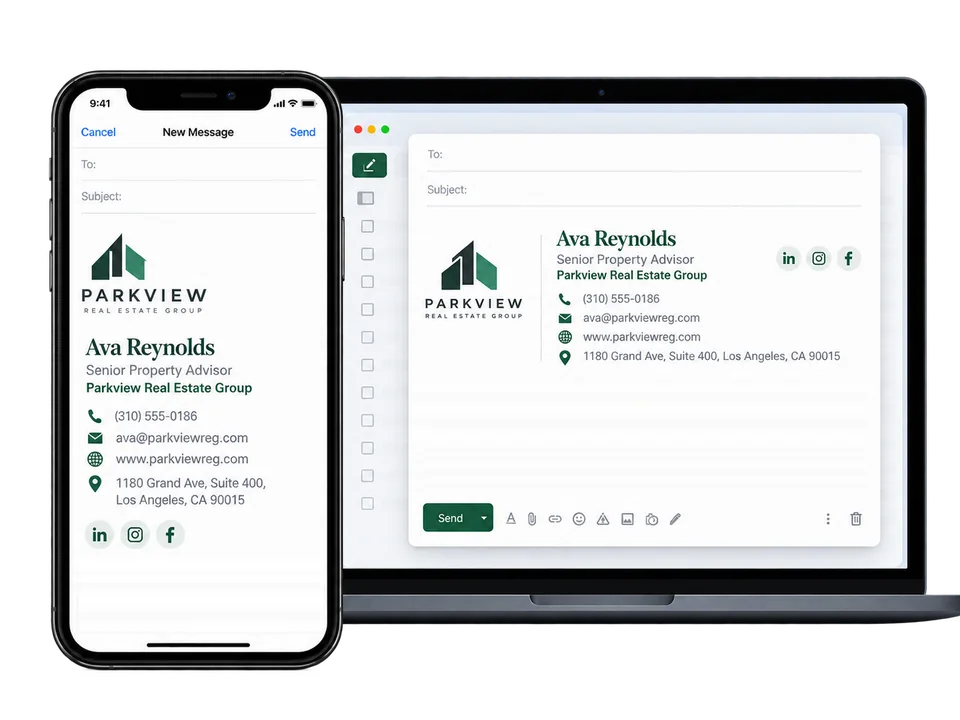
Add your logo, colors, contact details and social icons once. Check it at desktop and phone size, then copy it straight into Gmail, Outlook or Apple Mail. Growing a team? Give everyone a matching signature from one dashboard.

An example email signature for a fictional real estate agent, with logo, contact details and social icons, shown in a new email on a phone and a laptop.
Installation guides

Add it to the email app you already use.

Step-by-step guides for the three most common email apps, with fixes for missing logos, spacing and dark mode.

Email apps display signatures a little differently. We build with simple tables that most apps handle well, and every guide ends with a test email.

All help and troubleshooting
What you get

Built for the inbox, not just the screenshot.

Open the builder
Pricing

Create free. Upgrade when you want more.

Your first signature is free forever. Pro unlocks the premium designs you can already try in the editor, and Team keeps your whole company on-brand.

Billing period

Annual billing saves $25 on Pro and $79 on Team.

Free

For anyone who needs one professional email signature.

$0

Forever.

  • 1 signature (saved with a free account)
  • The free Minimal template
  • Your logo or profile photo
  • Contact details and social icons
  • Any brand color and 6 email-safe fonts
  • Live preview as you type
  • Copy, download and install guides
  • No watermark
Create Free Signature

No credit card required.

Team

For schools and businesses that want everyone on-brand.

$19/month

Billed monthly.

Includes 5 team members

+$2/month per additional member

Total: $19/month

School, district or large staff? Get a quote

Everything in Pro, plus:

  • Shared company logo, colors and layout
  • A matching signature for each person
  • Upload your staff list from a spreadsheet
  • Email each person their signature
  • See who has set theirs up
  • Update the design once, for everyone
  • Add or remove members anytime

Cancel anytime.

Compare plans in detail · Cancel anytime from Manage billing · Prices in US dollars

Done for you

Want us to design it for you?

Have our designers create a custom professional email signature tailored to your brand.

  • Custom Signature Design · One custom signature for one person, with an animated logo if you’d like one.
  • Company Signature Setup · $299 one time, one custom company design, personalized for up to 10 employees.
  • Final files and install instructions for your email app, delivered by email.
Starting at$99One-time payment
Example animated logo for Gravity XL Studio
Animated logo example

Animated GIFs play in Gmail, Apple Mail and most phone mail apps. Some older versions of Outlook for Windows show only the first frame, so we make sure the first frame is your complete logo.

FAQ

Questions, answered.

More in Help & troubleshooting, or contact us.

Is it really free?

Yes. The Minimal template is free forever, not a trial: create, edit, copy and use it with your logo, brand color and clickable contact links. No credit card, no watermark and no account needed. The five Pro templates are free to design with and preview too; you only upgrade if you want to copy one.

What costs money?

Pro ($7/month or $59/year) unlocks copying the 5 Pro templates, keeps up to 5 signatures and adds duplicating and saved brand colors. Team ($19/month or $149/year) includes 5 team members with a shared company design, and more members are $2/month each. Both renew until you cancel, and you can cancel anytime. Custom design, where a designer builds your signature, starts at $99 one-time and is separate from both. Fixing the details on your free Minimal signature is always free.

Can I add my logo?

Yes. Upload a PNG or JPEG to preview it, download the prepared image and insert it through your email app’s signature editor. If your logo is already online, you can use its public https image address instead.

Will it look identical in every email app?

No tool can promise that. Email apps handle formatting differently. We use simple table layouts and give installation steps, but send a test email to yourself and to a different email app before you rely on your signature.

Can my signature have an animated logo?

Yes, as part of Custom Signature Design ($99 one time): a designer turns your logo into a short animated GIF and helps you get it online so it can show in emails. Animated GIFs play in Gmail, Apple Mail and most phone mail apps. Some older versions of Outlook for Windows show only the first frame, so we make sure the first frame is your complete logo.

Do you host my uploaded logo?

Not in this version. Uploaded images are processed in your browser and aren’t sent to or published by this site.

Do you save my details?

Only if you choose to. Without an account, your draft stays in this browser tab (or on this device if you turn on “Remember on this device”). If you create a free account, your email address and the signature you save are stored in your account so you can edit it anywhere. Uploaded images are never stored. You can delete your signature or your whole account anytime.

Can I make signatures for my team?

Yes. The Team plan includes 5 team members at one company (you included), plus $2/month for each additional member, with a shared company design and one dashboard where you manage everyone’s signature. Or have a designer set it all up with Company Signature Setup. We don’t install signatures into employees’ email accounts automatically, and employees don’t get their own logins; each person copies their signature into their email app.

Can I use this on my phone?

You can design on a phone, but installing a formatted signature is usually easier in your email provider’s settings on a computer. Mobile email apps often use their own, simpler signature setting.

Are you affiliated with Gmail or Outlook?

No. Product names are only used to identify the email apps our guides cover.

A free email signature generator that works for you.

Make yours in seconds. Minimal is free forever, with no account needed.